
Are you looking for the best Surface Pro VGA adapters? We provide a curated list of reliable adapters to enhance your connectivity experience.
Struggling to connect your Surface Pro to older screens? You’re not alone. Many users face this issue when trying to share presentations or watch videos on VGA monitors or projectors.
These adapters are easy to use, reliable, and work seamlessly. Find the perfect one for your needs and upgrade your setup today.
List of Top 10 Surface Pro VGA Adapters
| Image | Title | Best For | Price |
|---|---|---|---|
 |
CableCreation USB C to VGA Adapter, Type C to VGA 1080P@60Hz Converter |
This USB C to VGA Adapter is perfect For anyone who needs to connect a new USB C device to an older VGA monitor or projector. It’s great for work, school, or presentations. |
|
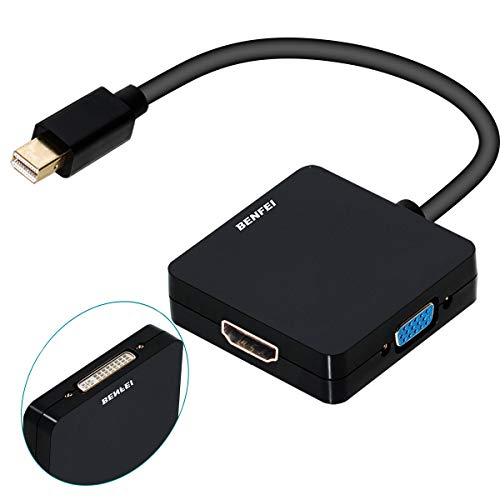 |
BENFEI Mini DisplayPort to HDMI VGA DVI 4K Adapter, 3-in-1 Gold-Plated | Mini DP to HDMI/DVI/VGA Adapter(Male to Female) Compatible with MacBook Air, Mac mini, Microsoft Surface Pro 3/4 |
This adapter is perfect for anyone with a MacBook, Surface Pro, or compatible laptop who wants to connect to a TV, monitor, or projector. It’s ideal for work, movies, or sharing content on a bigger screen. |
|
 |
AKWOR Mini Displayport to VGA Cable 6FT/2 Pack, Mini DP Display Port to VGA Adapter Cable (Thunderbolt 2 Compatible) with MacBook Air/Pro, Surface Pro/Dock, iMac, Mac mini, Monitor, Projector |
This AKWOR Mini Displayport to VGA Cable is perfect for anyone who needs to connect their MacBook, Surface Pro, iMac, or Mac mini to a monitor or projector. It’s ideal for those seeking a reliable, 6-foot cable in a convenient 2-pack. |
|
 |
Mini Display Port DP to HDMI VGA DVI Converter For Microsoft surface pro 1 2 3 4 |
This Mini Display Port Converter is perfect for Microsoft Surface Pro users who need to connect to different displays. It’s easy to use and works with HDMI, VGA, or DVI devices. |
|
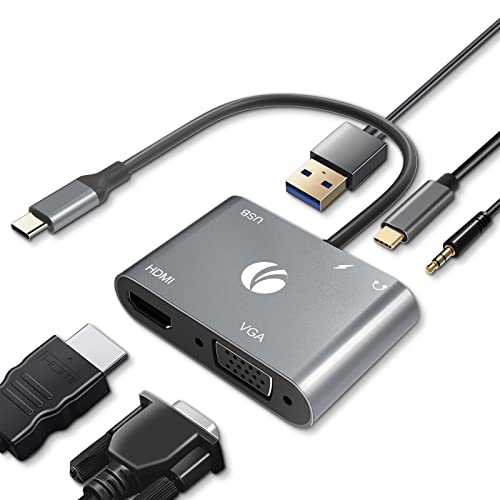 |
VCOM USB C to HDMI VAG Adapter, 5-in-1 USB C Hub with 100W Power Delivery, 4K HDMI, 1080P VGA, USB 3.0 Port, OTG Adapter Compatible with MacBook Air, iPad Pro, Dell XPS, Surface Pro (Grey) |
This adapter helps business users show work on big screens and travelers charge laptops fast. It works great for presenters and students who need extra ports for school and work. |
|
 |
Microsoft Surface VGA Adapter, Black |
This mini adapter is perfect for Surface users who need to plug into a VGA monitor. It is ideal for sharing slides and photos on a larger screen. |
|
 |
BENFEI Mini DisplayPort to VGA Adapter, Mini DP Display Port to VGA (Thunderbolt Compatible) Male to Female Adapter for ThinkPad SurfacePro PC |
This adapter is perfect for anyone who needs to connect their Mac or PC to an older monitor, projector, or TV with a VGA port. It’s great for home, office, or school use. |
|
 |
KUPOISHE USB C to VGA Adatper for Monitor, Thunderbolt 3 Multi-Display Video Converter Cable for MacBook Pro iPad Chromebook Surface and More Type C Laptop Tablet Android Phone |
This USB C to VGA adapter is perfect for anyone who wants to connect their laptop, tablet, or phone to a monitor, TV, or projector. It’s easy to use, with no drivers needed, making it great for work, school, or fun. |
|
 |
BUBUCAM USB C to VGA Adapter for Monitor 1080P, VGA to USB C Adapter Cable for Surface pro MacBook air iPad Chromebook, Compatible with Thunderbolt 3 Thunderbolt 4 USBC Type C |
This USB C to VGA adapter is perfect for anyone who needs to connect their laptop, tablet, or smartphone to a monitor, TV, or projector. It’s great for presentations, conferences, or sharing content with others. |
|
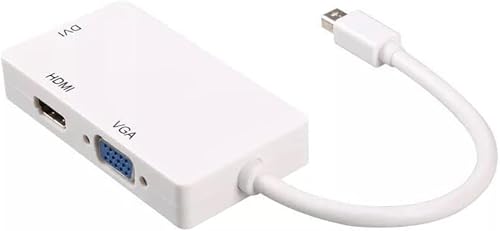 |
BUBUCAM Mini DP DisplayPort to HDMI VGA DVI Adapter Cable 3 in 1 Thunderbolt for MacBook |
This adapter is perfect for anyone who needs to connect their laptop to a TV, monitor, or projector. It’s great for MacBook or Mini-DP device users who want a reliable and compact solution. |
Detailed Reviews
Discover the top 10 Surface Pro VGA adapters handpicked for reliability, performance, and value. From plug-and-play simplicity to 4K resolution support, these adapters connect your devices seamlessly to VGA displays. Whether for work, entertainment, or multi-screen setups, find the perfect fit for your needs. Explore now and upgrade your connectivity with confidence!
1. CableCreation USB C to VGA Adapter, Type C to VGA 1080P@60Hz Converter
The CableCreation USB C to VGA Adapter lets you connect USB-C devices like laptops or tablets to VGA devices such as projectors or monitors. It’s a simple solution to use your new USB-C laptop with older VGA equipment.
This adapter is plug-and-play, needing no drivers. It supports high resolutions up to 1920×1200@60Hz. Comes with a 2-year warranty for peace of mind.
| Pros | Cons |
|---|---|
|
|
Perfect For:
This USB C to VGA Adapter is perfect For anyone who needs to connect a new USB C device to an older VGA monitor or projector. It’s great for work, school, or presentations.
Ready to Purchase?
2. BENFEI Mini DisplayPort to HDMI VGA DVI 4K Adapter, 3-in-1 Gold-Plated | Mini DP to HDMI/DVI/VGA Adapter(Male to Female) Compatible with MacBook Air, Mac mini, Microsoft Surface Pro 3/4
The BENFEI Mini DisplayPort to HDMI VGA DVI 4K Adapter is a 3-in-1 solution for connecting your devices. It works with Mini DisplayPort or Thunderbolt 2.0 computers to link to HDTVs, monitors, or projectors. Remember, only one port (HDMI, VGA, or DVI) can be used at a time.
This adapter supports 4K resolution for clear, sharp visuals. It also transmits audio via HDMI, perfect for movies, videos, or music. Use it to mirror or extend your screen for work or entertainment.
Gold-plated connectors ensure reliable performance. Triple shielding protects against signal loss. Broad compatibility works with MacBooks, Surface Pros, and more.
| Pros | Cons |
|---|---|
|
|
Perfect For:
This adapter is perfect for anyone with a MacBook, Surface Pro, or compatible laptop who wants to connect to a TV, monitor, or projector. It’s ideal for work, movies, or sharing content on a bigger screen.
Ready to Purchase?
3. AKWOR Mini Displayport to VGA Cable 6FT/2 Pack, Mini DP Display Port to VGA Adapter Cable (Thunderbolt 2 Compatible) with MacBook Air/Pro, Surface Pro/Dock, iMac, Mac mini, Monitor, Projector
The AKWOR Mini DisplayPort to VGA cable is a black cord. It is a simple tool to share your screen.
You get two cables in this pack. Each one is six feet long. It works with MacBook and Surface Pro.
Just plug it in to start. It gives you a reliable connection every time.
| Pros | Cons |
|---|---|
|
|
Perfect For:
This AKWOR Mini Displayport to VGA Cable is perfect for anyone who needs to connect their MacBook, Surface Pro, iMac, or Mac mini to a monitor or projector. It’s ideal for those seeking a reliable, 6-foot cable in a convenient 2-pack.
Ready to Purchase?
4. Mini Display Port DP to HDMI VGA DVI Converter For Microsoft surface pro 1 2 3 4
This Mini DisplayPort converter is perfect for Microsoft Surface Pro 1, 2, 3, and 4. It lets you connect to HDMI, VGA, or DVI devices easily.
No external power is needed. Just plug in and use one output at a time.
| Pros | Cons |
|---|---|
|
|
Perfect For:
This Mini Display Port Converter is perfect for Microsoft Surface Pro users who need to connect to different displays. It’s easy to use and works with HDMI, VGA, or DVI devices.
Ready to Purchase?
5. VCOM USB C to HDMI VAG Adapter, 5-in-1 USB C Hub with 100W Power Delivery, 4K HDMI, 1080P VGA, USB 3.0 Port, OTG Adapter Compatible with MacBook Air, iPad Pro, Dell XPS, Surface Pro (Grey)
The VCOM 5-in-1 USB-C Hub is your all-in-one solution for connectivity. It combines 4K HDMI, 1080P VGA, 100W Power Delivery, USB 3.0, and OTG Adapter into one compact device. Perfect for MacBook Air, iPad Pro, Dell XPS, and Surface Pro, it simplifies your setup for work or play.
Enjoy 4K visuals with HDMI output at 60Hz. Transfer files fast with USB 3.0 at 5Gbps. Charge quickly with 100W Power Delivery.
Its plug-and-play design works with Windows, macOS, ChromeOS, and Linux. The aluminum shell ensures durability and heat dissipation. Its small size makes it ideal for travel and business trips.
| Pros | Cons |
|---|---|
|
|
Perfect For:
This adapter helps business users show work on big screens and travelers charge laptops fast. It works great for presenters and students who need extra ports for school and work.
Ready to Purchase?
6. Microsoft Surface VGA Adapter, Black
The Microsoft Surface VGA Adapter lets you connect your Surface to any VGA-compatible display. It has a DisplayPort male connector and a VGA female connector. This adapter supports high resolutions up to 1920 x 1200.
It’s designed for Surface devices like the Surface Pro and Surface Laptop. Use it to share photos, videos, and presentations easily at work or home.
| Pros | Cons |
|---|---|
|
|
Perfect For:
This mini adapter is perfect for Surface users who need to plug into a VGA monitor. It is ideal for sharing slides and photos on a larger screen.
Ready to Purchase?
7. BENFEI Mini DisplayPort to VGA Adapter, Mini DP Display Port to VGA (Thunderbolt Compatible) Male to Female Adapter for ThinkPad SurfacePro PC
The BENFEI Mini DisplayPort to VGA Adapter lets you connect your Mini DisplayPort or Thunderbolt device to a VGA monitor, projector, or HDTV. It supports 1080P Full HD video for clear, sharp images. Its gold-plated connectors ensure durability and reliable performance.
This adapter is compact and lightweight, perfect for travel or sharing videos. It works with Mac devices and includes a 45-day money-back guarantee and an 18-month warranty.
| Pros | Cons |
|---|---|
|
|
Perfect For:
This adapter is perfect for anyone who needs to connect their Mac or PC to an older monitor, projector, or TV with a VGA port. It’s great for home, office, or school use.
Ready to Purchase?
8. KUPOISHE USB C to VGA Adatper for Monitor, Thunderbolt 3 Multi-Display Video Converter Cable for MacBook Pro iPad Chromebook Surface and More Type C Laptop Tablet Android Phone
The KUPOISHE USB C to VGA Adapter lets you connect your devices to VGA displays easily. It’s perfect for multi-screen setups at home or work.
Works with USB-C devices like MacBook Pro, iPad, Chromebook, and Android phones. Just plug it in—no drivers needed.
Enjoy clear video on TVs, monitors, or projectors. It’s simple, reliable, and ready to use.
| Pros | Cons |
|---|---|
|
|
Perfect For:
This USB C to VGA adapter is perfect for anyone who wants to connect their laptop, tablet, or phone to a monitor, TV, or projector. It’s easy to use, with no drivers needed, making it great for work, school, or fun.
Ready to Purchase?
9. BUBUCAM USB C to VGA Adapter for Monitor 1080P, VGA to USB C Adapter Cable for Surface pro MacBook air iPad Chromebook, Compatible with Thunderbolt 3 Thunderbolt 4 USBC Type C
The BUBUCAM USB C to VGA Adapter lets you connect devices like laptops, tablets, or smartphones to monitors, TVs, or projectors. It’s great for presentations, workshops, and lectures. Easy to use for multi-screen displays.
This adapter supports full HD 1080P at 60Hz, giving you clear and smooth video. Works with Surface Pro, MacBook Air, iPad, and Chromebook. Reliable performance for all your needs.
Made with premium aluminum for durability and heat dissipation. The reinforced TPE cable prevents interference with wireless devices. Simple and dependable for everyday use.
| Pros | Cons |
|---|---|
|
|
Perfect For:
This USB C to VGA adapter is perfect for anyone who needs to connect their laptop, tablet, or smartphone to a monitor, TV, or projector. It’s great for presentations, conferences, or sharing content with others.
Ready to Purchase?
10. BUBUCAM Mini DP DisplayPort to HDMI VGA DVI Adapter Cable 3 in 1 Thunderbolt for MacBook
Make your screen huge. Use this adapter on a big TV.
Switch video types easily. Use HDMI, VGA, or DVI.
No dropped signals. No flickers on your screen. Get a steady view.
| Pros | Cons |
|---|---|
|
|
Perfect For:
This adapter is perfect for anyone who needs to connect their laptop to a TV, monitor, or projector. It’s great for MacBook or Mini-DP device users who want a reliable and compact solution.
Ready to Purchase?
Buying Guide
Connecting your Surface Pro to older screens should be simple. These adapters make sharing your work and fun effortless for everyone.
- Compatibility: Check your Surface Pro model port before you buy. Some use USB-C while older ones need a Mini DisplayPort. The right adapter ensures broad compatibility with your devices.
- Resolution Support: Look for adapters that offer high resolutions like 1080P or 4K. You get clear and sharp images on your monitor. Great for movies and detailed slides.
- Ease of Use: Most modern adapters are plug-and-play. They need no drivers to start working. Just plug them in for a reliable connection.
- Multi-functional Ports: Some options are 3-in-1 or 5-in-1 hubs. They let you use HDMI, VGA, or DVI. But remember, you can only use one port at a time.
- Build and Materials: Choose adapters with gold-plated connectors. An aluminum shell provides great durability. It also helps with heat dissipation during long use.
- Cable Length and Pack Size: Some packs come with two cables. They are often six feet long. This gives you flexibility when connecting devices.
- Warranty and Support: A good warranty shows a brand stands by its product. Look for a 2-year warranty or a money-back guarantee. It protects your investment.