
Looking for the best Thunderbolt to VGA adapters? We’ve compiled a list of 10 top-rated options to help you find the perfect adapter for seamless connectivity and crystal-clear visuals.
Thunderbolt to VGA adapters are essential tools for connecting modern devices to older displays. They bridge the gap between USB-C or Mini DisplayPort devices and VGA monitors, projectors, or TVs. Whether for work, gaming, or entertainment, these adapters ensure seamless connectivity and clear visuals.
These adapters are compact, durable, and easy to use. They support high resolutions like 1080p and 1920×1200, delivering sharp images without hassle. Many are plug-and-play, requiring no extra setup.
With options from BENFEI, Amazon Basics, Plugable, and more, finding the perfect adapter is simple. Each offers unique features like aluminum shells, gold-plated connectors, or warranties for peace of mind. Upgrade your setup effortlessly and enjoy crystal-clear visuals every time.
List of Top 10 Thunderbolt to VGA Adapters
| Image | Title | Best For | Price |
|---|---|---|---|
 |
BENFEI Mini DisplayPort to VGA Adapter, Mini DP Display Port to VGA (Thunderbolt Compatible) Male to Female Adapter for ThinkPad SurfacePro PC |
This adapter is perfect for anyone who needs to connect their Mac or PC to an older monitor, projector, or TV with a VGA port. It’s ideal for home, office, or school use. |
|
 |
Amazon Basics USB-C to VGA Adapter, Aluminum Shell, Thunderbolt 3 Compatible, Plug-n-Play, 1080P, Gray, 1.65 x 1.38 x 0.63in |
This adapter is perfect for anyone who needs to connect their USB-C device to a VGA monitor or display. It’s easy to use, portable, and works right away—no extra steps needed. |
|
 |
BENFEI USB C to VGA Adapter, 2 Pack Thunderbolt 3 to VGA Adapter Compatible for MacBook Pro 2019/2018/2017, MacBook Air/iPad Pro 2018, Samsung Galaxy S10/S9 [Aluminium Shell,Grey] |
This USB C to VGA adapter is perfect for anyone who needs to connect their laptop or tablet to a monitor, projector, or TV. It’s great for business presentations, extending your screen, or sharing content with others. |
|
 |
[Thunderbolt 3/4/5]USB Type-C to VGA Adapter Conversion 1080P@60Hz for External Video Card Multi Monitor, Desktop, Laptop, HDTV, Monitor, Projector Compatible with MacOS ,Windows, Linux, iPadOs |
This adapter is perfect for anyone who needs to connect a laptop, desktop, or phone to a monitor, projector, or TV. It’s great for work, gaming, or watching movies with clear, high-definition display. |
|
 |
Apple USB-C VGA Multiport Adapter |
This adapter is perfect for anyone who needs to connect their Mac or iPad Pro to a VGA display. It’s great for sharing videos, presentations, or photos on a bigger screen. |
|
 |
Plugable Mini DisplayPort (Thunderbolt 2) to VGA Adapter – Supports Mini-DisplayPort Equipped Mac, Windows, Linux Systems to VGA Displays up to 1920×1080, Active – Driverless |
This adapter is perfect for anyone who needs to connect a Mini DisplayPort or Thunderbolt 2 device to a VGA monitor. It’s great for home, work, or school use, offering clear and smooth visuals without extra software. |
|
 |
Plugable USB C to VGA Adapter, Driverless, Supports up to 1920×1200 @ 60Hz | Thunderbolt 3 to VGA Adapter Compatible with Macbook Pro, Windows, Chromebooks, 2018 iPad Pro, Dell XPS, and more |
This USB-C to VGA adapter is perfect for anyone who needs to connect a monitor, projector, or TV to their laptop, tablet, or computer. It’s great for work, school, or travel and works with MacBook, Windows, Chromebooks, and more. |
|
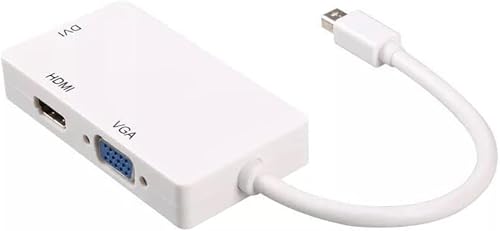 |
BUBUCAM Mini DP DisplayPort to HDMI VGA DVI Adapter Cable 3 in 1 Thunderbolt for MacBook |
MacBook and PC users will find this useful. It links laptops to a TV or monitor. |
|
 |
CableCreation USB C to VGA Adapter, Type C to VGA 1080P@60Hz Converter |
This USB C to VGA Adapter is perfect for anyone who needs to connect a new USB C device to an older VGA monitor or projector. It’s great for work, school, or presentations. |
|
 |
StarTech Mini DisplayPort to VGA Adapter, 1920 x 1200, Black (MDP2VGA2) | mDP 1.2 HBR2, EDID & DDC pass-through, Thunderbolt 1/2 Mac/PC, No drivers, 1080p, mDP 1.2 to VGA dongle, Screw locking VGA |
This adapter is perfect for anyone who needs to connect a VGA display or projector to a Mini DisplayPort device. It’s great for work or home, easy to use, and works with any OS. |
Detailed Reviews
Discover the top 10 Thunderbolt to VGA adapters carefully selected for performance, durability, and value. Each adapter is expert-reviewed and backed by real user feedback, ensuring you find the perfect fit. Whether for work, gaming, or travel, these adapters deliver clear, sharp visuals and seamless connectivity. Dive in to find the best match for your needs and upgrade your setup with confidence.
1. BENFEI Mini DisplayPort to VGA Adapter, Mini DP Display Port to VGA (Thunderbolt Compatible) Male to Female Adapter for ThinkPad SurfacePro PC
The BENFEI Mini DisplayPort to VGA Adapter connects your Mini DisplayPort or Thunderbolt device to a VGA monitor, projector, or HDTV. It supports 1080P Full HD video for clear, sharp images. Its gold-plated connectors ensure durability and reliable signal strength.
This adapter is lightweight and compact, perfect for travel or video sharing. It’s compatible with Mac devices and comes with a 45-day money-back guarantee and an 18-month warranty.
| Pros | Cons |
|---|---|
|
|
Perfect For:
This adapter is perfect for anyone who needs to connect their Mac or PC to an older monitor, projector, or TV with a VGA port. It’s ideal for home, office, or school use.
Ready to Purchase?
2. Amazon Basics USB-C to VGA Adapter, Aluminum Shell, Thunderbolt 3 Compatible, Plug-n-Play, 1080P, Gray, 1.65 x 1.38 x 0.63in
The Amazon Basics USB-C to VGA Adapter is a handy tool for connecting devices to monitors or displays. It’s plug-and-play, so no extra setup is needed. Its compact design makes it easy to carry anywhere.
It supports HD video up to 1080p, ensuring clear and sharp visuals. Works with USB-C and Thunderbolt 3 ports, making it versatile for many devices.
The aluminum shell is lightweight and durable, perfect for on-the-go use. It’s backed by a 1-year warranty, giving you peace of mind.
| Pros | Cons |
|---|---|
|
|
Perfect For:
This adapter is perfect for anyone who needs to connect their USB-C device to a VGA monitor or display. It’s easy to use, portable, and works right away—no extra steps needed.
Ready to Purchase?
3. BENFEI USB C to VGA Adapter, 2 Pack Thunderbolt 3 to VGA Adapter Compatible for MacBook Pro 2019/2018/2017, MacBook Air/iPad Pro 2018, Samsung Galaxy S10/S9 [Aluminium Shell,Grey]
The BENFEI USB C to VGA Adapter lets you connect USB-C devices to VGA monitors, projectors, or TVs. It’s compact and portable, perfect for business presentations or extending your screen.
Built-in IC chip ensures stable signal conversion. Corrosion-resistant connectors and durable design improve performance and longevity. *Supports resolutions up to 19201200@60Hz.
Compatible with MacBook, iPad Pro, Samsung Galaxy, and more. Comes with an 18-month warranty for peace of mind. Easy-to-reach customer service for quick support.
| Pros | Cons |
|---|---|
|
|
Perfect For:
This USB C to VGA adapter is perfect for anyone who needs to connect their laptop or tablet to a monitor, projector, or TV. It’s great for business presentations, extending your screen, or sharing content with others.
Ready to Purchase?
4. [Thunderbolt 3/4/5]USB Type-C to VGA Adapter Conversion 1080P@60Hz for External Video Card Multi Monitor, Desktop, Laptop, HDTV, Monitor, Projector Compatible with MacOS ,Windows, Linux, iPadOs
This USB-C to VGA adapter lets you connect your laptop or phone to a bigger screen. It’s perfect for work, gaming, or watching movies on a monitor, TV, or projector.
It’s compact, durable, and easy to use. Works with MacOS, Windows, Linux, and iPadOs. No audio support, but pairs well with Bluetooth devices.
| Pros | Cons |
|---|---|
|
|
Perfect For:
This adapter is perfect for anyone who needs to connect a laptop, desktop, or phone to a monitor, projector, or TV. It’s great for work, gaming, or watching movies with clear, high-definition display.
Ready to Purchase?
5. Apple USB-C VGA Multiport Adapter
The Apple USB-C VGA Multiport Adapter connects your Mac or iPad Pro to a VGA display. It also lets you charge and sync devices easily.
Mirror your screen in 1080p HD. Connect a USB device or charging cable. Use it with movies or captured video.
You’ll need a VGA cable (sold separately). It works with USB-C or Thunderbolt 3 ports.
| Pros | Cons |
|---|---|
|
|
Perfect For:
This adapter is perfect for anyone who needs to connect their Mac or iPad Pro to a VGA display. It’s great for sharing videos, presentations, or photos on a bigger screen.
Ready to Purchase?
6. Plugable Mini DisplayPort (Thunderbolt 2) to VGA Adapter – Supports Mini-DisplayPort Equipped Mac, Windows, Linux Systems to VGA Displays up to 1920×1080, Active – Driverless
The Plugable Mini DisplayPort to VGA Adapter connects your Apple or Windows device to a VGA monitor. It works with Thunderbolt 2 and Mini DisplayPort outputs. No extra software is needed for setup.
Enjoy clear visuals up to 1920×1200 resolution, including 1080P at 60Hz. It’s plug-and-play, so you can start using it right away.
This adapter is easy to use and compatible with many systems. It ensures seamless connectivity for crystal-clear images and videos. Upgrade your viewing experience effortlessly.
| Pros | Cons |
|---|---|
|
|
Perfect For:
This adapter is perfect for anyone who needs to connect a Mini DisplayPort or Thunderbolt 2 device to a VGA monitor. It’s great for home, work, or school use, offering clear and smooth visuals without extra software.
Ready to Purchase?
7. Plugable USB C to VGA Adapter, Driverless, Supports up to 1920×1200 @ 60Hz | Thunderbolt 3 to VGA Adapter Compatible with Macbook Pro, Windows, Chromebooks, 2018 iPad Pro, Dell XPS, and more
The Plugable USB C to VGA Adapter lets you connect external displays easily. It works with USB-C and Thunderbolt 3 systems. Perfect for monitors, projectors, or TVs.
Enjoy sharp visuals up to 1920×1200 @ 60Hz. The flat, flexible cable makes it durable and portable. Great for travel and any workspace.
Works with MacBook, Windows, Chromebooks, and more. Comes with 2-year coverage and lifetime support. Simple, reliable, and ready to use.
| Pros | Cons |
|---|---|
|
|
Perfect For:
This USB-C to VGA adapter is perfect for anyone who needs to connect a monitor, projector, or TV to their laptop, tablet, or computer. It’s great for work, school, or travel and works with MacBook, Windows, Chromebooks, and more.
Ready to Purchase?
8. BUBUCAM Mini DP DisplayPort to HDMI VGA DVI Adapter Cable 3 in 1 Thunderbolt for MacBook
The BUBUCAM Mini DP Adapter connects your laptop to TVs, monitors, or projectors. It works with HDMI, VGA, or DVI ports. This 3-in-1 tool is compact and easy to carry.
It ensures a reliable connection with no signal loss or flickering. Works with MacBook, Surface Pro, and other devices with Mini DP or Thunderbolt 2 ports.
| Pros | Cons |
|---|---|
|
|
Perfect For:
MacBook and PC users will find this useful. It links laptops to a TV or monitor.
Ready to Purchase?
9. CableCreation USB C to VGA Adapter, Type C to VGA 1080P@60Hz Converter
The CableCreation USB C to VGA Adapter is a handy tool for connecting new USB-C devices to older VGA screens. It’s perfect for laptops, tablets, and phones that need to link to projectors or monitors. This adapter makes it easy to share your screen in clear 1080P quality.
No drivers are needed—just plug and play. It works with extend or mirror modes and supports *up to 19201200@60Hz. Its compact size fits in your pocket, making it great for travel.
It’s built to last with sturdy materials and works with many devices, like MacBooks, iPads, and Galaxy phones. Plus, it comes with a 2-year warranty for peace of mind.
| Pros | Cons |
|---|---|
|
|
Perfect For:
This USB C to VGA Adapter is perfect for anyone who needs to connect a new USB C device to an older VGA monitor or projector. It’s great for work, school, or presentations.
Ready to Purchase?
10. StarTech Mini DisplayPort to VGA Adapter, 1920 x 1200, Black (MDP2VGA2) | mDP 1.2 HBR2, EDID & DDC pass-through, Thunderbolt 1/2 Mac/PC, No drivers, 1080p, mDP 1.2 to VGA dongle, Screw locking VGA
The StarTech Mini DisplayPort to VGA Adapter lets you connect a VGA display or projector to your device. It supports high resolutions up to 1920×1200 and 1080p at 60Hz. The compact design makes it perfect for travel and everyday use.
This adapter works with Thunderbolt 1/2 MacBooks, Microsoft Surface PCs, and more. It requires no drivers, so it’s easy to use with any operating system. The screw-locking VGA feature ensures a secure connection to your display.
| Pros | Cons |
|---|---|
|
|
Perfect For:
This adapter is perfect for anyone who needs to connect a VGA display or projector to a Mini DisplayPort device. It’s great for work or home, easy to use, and works with any OS.
Ready to Purchase?
Buying Guide
Thunderbolt to VGA adapters are perfect for connecting modern devices to older screens. They’re compact, easy to use, and work for work, gaming, or fun. Find the right one to enjoy clear visuals every time.
Factors to Consider When Buying:
– Compatibility: Check if the adapter works with your device’s ports, like USB-C, Mini DisplayPort, or Thunderbolt.
– Resolution: Look for adapters that support 1080p or 1920×1200 for sharp images.
– Build Quality: Choose durable options with aluminum shells or gold-plated connectors for long-lasting use.
– Portability: Go for compact and lightweight designs if you travel often.
– Plug-and-Play: Pick adapters that require no extra setup for hassle-free use.
– Warranty: Opt for brands offering warranties or guarantees for peace of mind.
– Price: Compare prices to find the best value without sacrificing quality.
– Brand Reputation: Trust brands like BENFEI, Amazon Basics, or Plugable for reliability.
Upgrade your setup with the perfect adapter and enjoy seamless connectivity every time.